---
title: "เริ่มต้น: เขียน Python เทรดบน MT5 แบบง่ายๆ"
url: "https://www.forexinthai.com/105121/"
type: "post"
author: "ForexInThai"
published: "2024-05-03T16:18:32+07:00"
modified: "2025-03-26T15:27:45+07:00"
excerpt: "สวัสดีครับ บทความนี้ เราจะมาเรียนรู้การเขียน Python เพื่อการเทรดบน MT5 ทีละขั้นตอน เนื้อหานี้ เหมาะกับท่านที่มีพื้นฐานการเขียนโปรแกรมมาก่อนนะครับ ในบทความนี้ท่านจะได้เรียนรู้เกี่ยวกับ การเชื่อมต่อ py…"
categories:
- "ดาวน์โหลด"
- "พื้นฐาน Forex (Forex Basics)"
---
# เริ่มต้น: เขียน Python เทรดบน MT5 แบบง่ายๆ
สวัสดีครับ บทความนี้ เราจะมาเรียนรู้การเขียน Python เพื่อการเทรดบน MT5 ทีละขั้นตอน เนื้อหานี้ เหมาะกับท่านที่มีพื้นฐานการเขียนโปรแกรมมาก่อนนะครับ
**ในบทความนี้ท่านจะได้เรียนรู้เกี่ยวกับ**
- การเชื่อมต่อ python กับ MT5
- การกำหนดค่าให้ python ส่งคำสั่งซื้อขายบน MT5 ได้
- การเขียนสูตร สำหรับตรวจจับรูปแบบแท่งเทียน
## สิ่งจำเป็นต้องมี
- คอมพิวเตอร์ OS : Windows 11
- Python 3.11 ติดตั้งผ่าน Microsoft Store ได้เลย
- Windows Terminal ติดตั้งผ่าน Microsoft Store ได้เลย
- โปรแกรม Editor : Notepad++ , Visual Studio Code หรือ อื่นๆ ที่ถนัด
- MetaTrader 5
- บัญชีเทรด จะใช้บัญชีจริง หรือบัญชีทดลอง ก็ได้
ตรวจสอบความพร้อมก่อนใช้งาน
[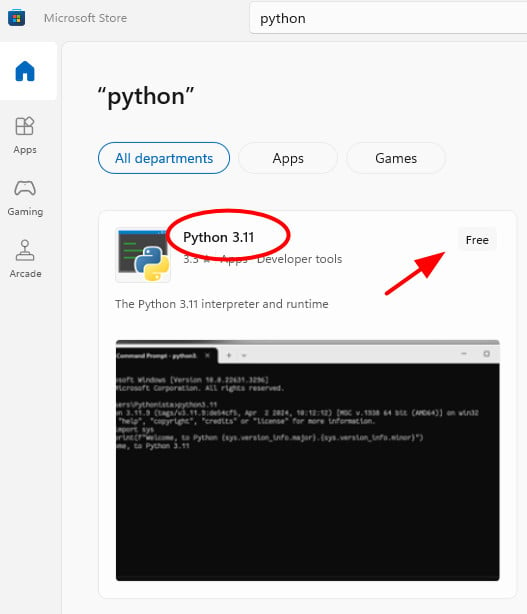](https://www.forexinthai.com/wp-content/uploads/2024/05/วิธีติดตั้ง-python-3-11-windows-11.jpg)ตรวจสอบ version python ว่าติดตั้งได้ถูกต้องพร้อมใช้งานหรือยัง
```
python --version
หรือ
python -V
```
[](https://www.forexinthai.com/wp-content/uploads/2024/05/check-version-python.jpg)ติดตั้งตัว library
```
pip install MetaTrader5
pip install pandas
pip install ta
```
## เปิดบัญชีเทรด และ ติดตั้งโปรแกรม MT5
ในตัวอย่างโบรกเกอร์ที่ผมใช้ คือโบรก [eightcap](https://join.eightcap.com/visit/?bta=36112&brand=eightcap) เป็นโบรกเกอร์ที่เหมาะสำหรับใช้เทรดทองคำ
เพราะมีสเปรดต่ำและมีความเสถียรสูง
## กำหนดค่าบัญชีเทรด สำหรับใช้เชื่อมต่อ MT5
สร้างไฟล์ .env สำหรับเก็บค่าตัวแปร ข้อมูลบัญชีเทรดเพื่อใช้สำหรับการเชื่อมต่อกับ MT5 มีข้อมูลดังนี้
```
DIR="EightCap MetaTrader 5"
LOGIN=5016127
PWD="xxxx"
SERVER="Eightcap-Live"
SYMBOL="XAUUSD"
```
ถ้าใช้ โบรกเกอร์ Eness ตรง SYMBOL ให้เช็คว่าคู่เงินตรงกัน เพราะถ้าเป็นบัญชี Standard ของ Exness จะมี ตัว m ห้อยท้ายคู่เงินอยู่ เช่น XAUUSDm ,EURUSDm เป็นต้น
## อธิบายค่าตัวแปรต่าง ๆ
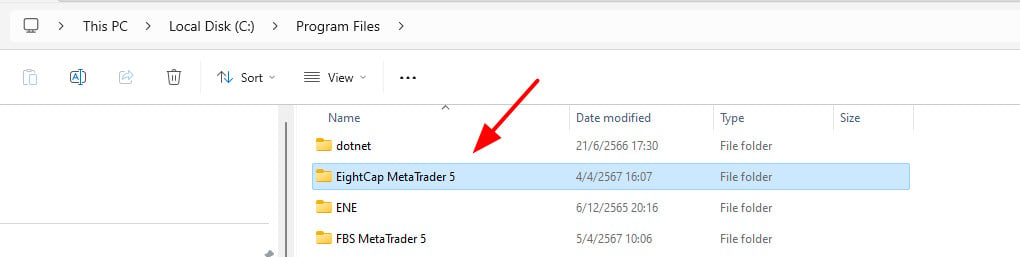
- DIR คือ ชื่อโฟล์เดอร์ ที่ติดตั้งโปรแกรม MT5 ตามโบรกเกอร์ที่ท่านใช้ ตัวอย่าง โบรกเกอร์ EightCap ชื่อโฟล์เดอร์คือ EightCap MetaTrader 5 จะอยู่ใน Path C:\\Program Files\\\[โฟล์เดอร์ โบรกเกอร์ MetaTrader5\]
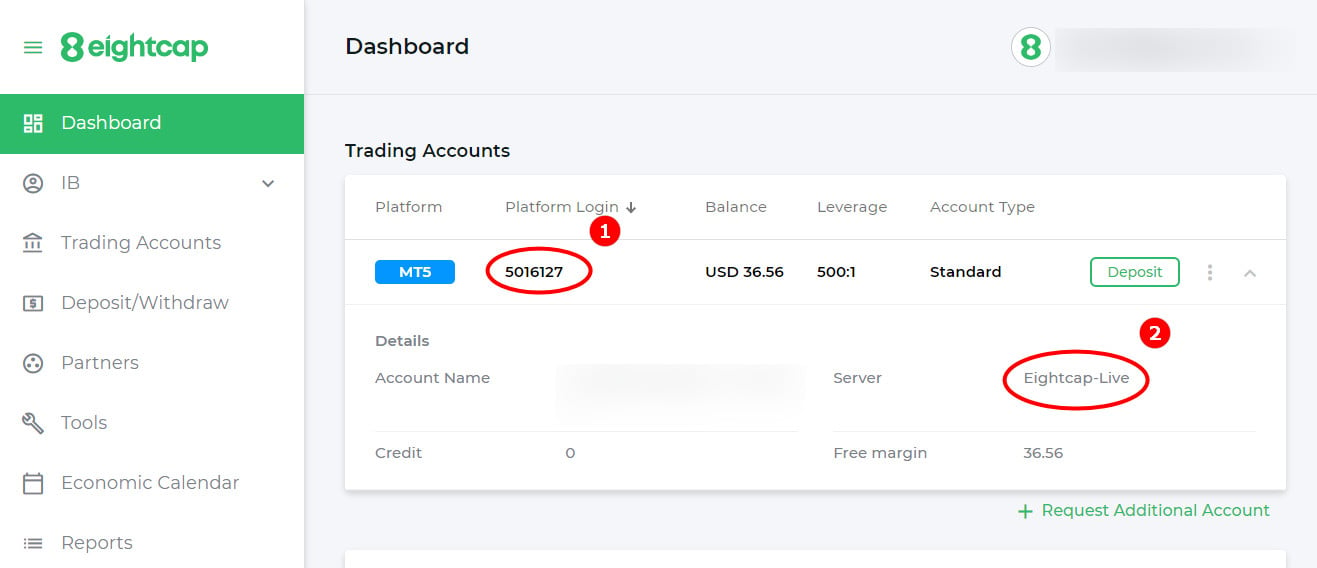
[](https://www.forexinthai.com/wp-content/uploads/2024/04/เชื่อมต่อกับ-mt5-ด้วย-python.jpg)- LOGIN คือ เลขบัญชีเทรด (ตามรูปตัวอย่าง 1)
- PWD คือ รหัสผ่านซื้อขาย
- SERVER คือ ชื่อ Server โบรกเกอร์ที่กำหนดให้ในบัญชีเทรดของท่าน (ตามรูปตัวอย่าง 2)
[](https://www.forexinthai.com/wp-content/uploads/2024/04/ข้อมูลบัญชีเทรด-eightcap.jpg)ดาวน์โหลด library MT เพื่อใช้ในการเชื่อมต่อ กับ MT5
MT.zip
Library Python สำหรับใช้เชื่อมต่อกับ โปรแกรม MetaTrader 5
[ดาวน์โหลด MT.zip](https://www.forexinthai.com/wp-content/uploads/2024/05/MT.zip)
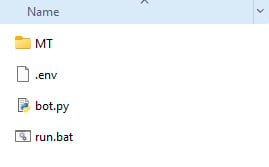
แตกไฟล์ MT.zip ไว้ในโฟลเดอร์เดียวกันกับ ไฟล์ .env
[](https://www.forexinthai.com/wp-content/uploads/2024/05/ไฟล์ทั้งหมด.jpg)## เริ่มต้นเขียน Python
ไฟล์ bot.py
```
import MetaTrader5 as mt
import pandas as pd
import os
import time
import socket
import ta
from time import sleep
from dotenv import load_dotenv
load_dotenv()
folder_dir = os.getenv('DIR')
login = int(os.getenv('LOGIN'))
pwd = os.getenv('PWD')
server = os.getenv('SERVER')
symbol = os.getenv('SYMBOL')
path = "C:/Program Files/" + folder_dir +"/terminal64.exe"
strategy_name = "Candlestick Bot"
if __name__ == '__main__':
# connect to MetaTrader5 Terminal
if not mt.initialize(path=path,login=login, server=server,password=pwd):
print("Initialize() failed, error code =", mt.last_error())
quit()
print(" _____ ___ _____ _ _")
print("| ______ _ __ _____ _|_ _|_ __ |_ _| |__ __ _(_)")
print("| |_ / _ \| '__/ _ \ \/ | || '_ \ | | | '_ \ / _` | |")
print("| _| (_) | | | __/> < | || | | | | | | | | (_| | |")
print("|_| \___/|_| \___/_/\_|___|_| |_ |_| |_| |_|\__,_|_|")
print("")
```
สร้างไฟล์ run.bat สำหรับเรียกใช้
```
start python bot.py
```
## ทดสอบ Run สคริปต์ Python เชื่อมต่อ MT5
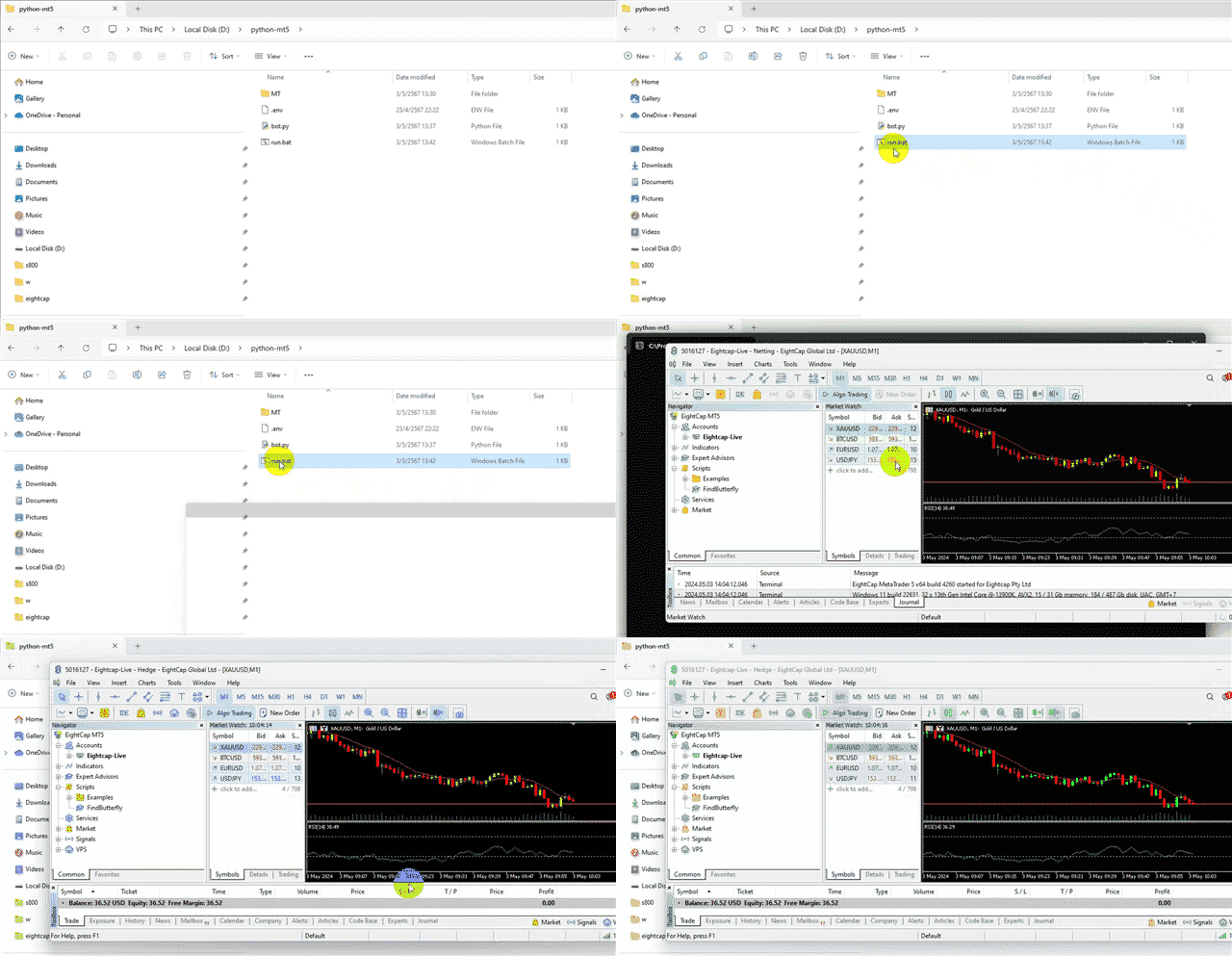
ลองดับเบิลคลิก ที่ไฟล์ run.bat เพื่อ run สคริปต์ bot.py
ถ้าไม่มีอะไรผิดพลาด โปรแกรม MT5 จะเปิดขึ้นมา พร้อม Login บัญชีเทรดให้ทันที
[](https://www.forexinthai.com/wp-content/uploads/2024/05/ทดสอบ-run-สคริปต์-python-เชื่อมต่อ-mt5.gif)
## เริ่มต้นเขียน Bot ให้เทรดตามเงื่อนไข
หลังจากที่เรา เชื่อมต่อกับ MT5 ได้แล้ว เรามาเขียน bot สำหรับส่งคำสั่ง buy , sell กัน
โดยเงื่อนไขในการ ออก ออเดอร์ เราให้ bot หา รูปแบบแท่งเทียน (Candlestick pattern) ที่เราต้องการ
รูปแบบแท่งเทียนสามารถอ่านเพิ่มเติมได้ที่บทความ
รูปแบบแท่งเทียนที่เราจะนำมาใช้ เพื่อ ออก ออเดอร์ ในบทความนี้ คือ Morning star pattern และ Bearish Evening Start นะครับ
[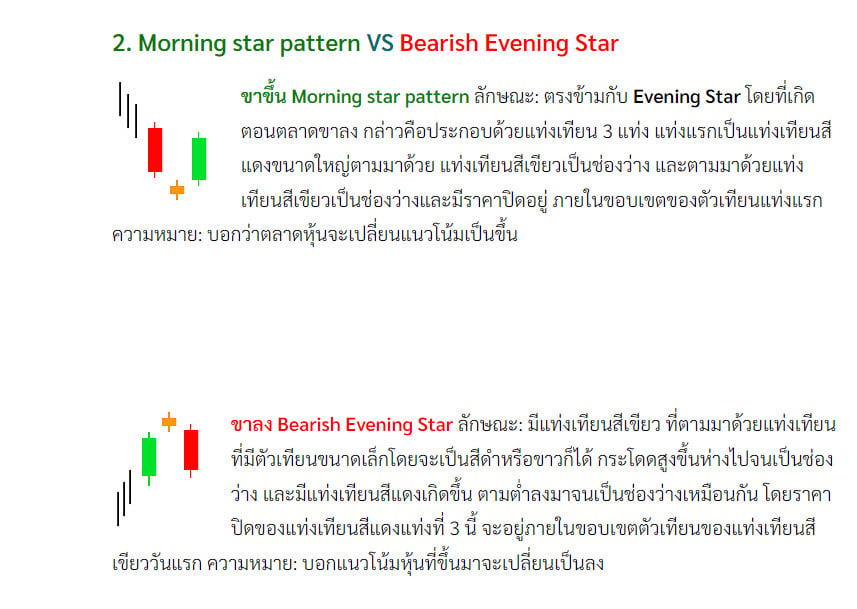](https://www.forexinthai.com/wp-content/uploads/2024/05/morning-star-pattern.jpg)จากเงื่อนไขรูปแบบ Morning star pattern และ Bearish Evening Start เขียนเป็นสูตร ได้ดังนี้
function **is\_morning\_star** ตรวจจับ รูปแบบ Morning star pattern return ค่าเป็น True / False
```
#buy
def is_morning_star(df):
# เงื่อนไขสำหรับแท่งเทียนแต่ละวัน
first_candle_bearish = df['close2'] > df['open2']
small_body_second_day = abs(df['close1'] - df['open1']) <= (df['high1'] - df['low1']) / 3
third_candle_bullish = df['close'] > df['open']
# ตำแหน่งของแท่งเทียนวันที่สองและสาม
second_candle_gap_down = df['open1'] < df['close2']
third_candle_closes_above_first_midpoint = df['close'] > (df['open2'] + (df['close2'] - df['open2']) / 2)
# ตรวจสอบทั้งสามแท่งเทียน
morning_star = first_candle_bearish & small_body_second_day & second_candle_gap_down & third_candle_bullish & third_candle_closes_above_first_midpoint
return morning_star
```
function **is\_bearish\_evening\_star** ตรวจจับ รูปแบบ Bearish Evening Start return ค่าเป็น True / False
```
#sell
def is_bearish_evening_star(df):
# เงื่อนไขสำหรับแท่งเทียนแต่ละวัน
first_candle_bullish = df['close2'] > df['open2']
small_body_second_day = abs(df['close1'] - df['open1']) <= (df['high1'] - df['low1']) / 3
third_candle_bearish = df['close'] < df['open']
# ตำแหน่งของแท่งเทียนวันที่สองและสาม
second_candle_gap_up = df['open1'] > df['close2']
third_candle_closes_below_first_midpoint = df['close'] < (df['open2'] + (df['close2'] - df['open2']) / 2)
# ตรวจสอบทั้งสามแท่งเทียน
evening_star = first_candle_bullish & small_body_second_day & second_candle_gap_up & third_candle_bearish & third_candle_closes_below_first_midpoint
return evening_star
```
เขียน function **market\_order** สำหรับ สร้าง ออเดอร์
```
def market_order(symbol, volume, order_type, deviation, magic, stoploss, take_profit,strategy_name):
order_type_dict = {
'buy': mt.ORDER_TYPE_BUY,
'sell': mt.ORDER_TYPE_SELL
}
price_dict = {
'buy': mt.symbol_info_tick(symbol).ask,
'sell': mt.symbol_info_tick(symbol).bid
}
request = {
"action": mt.TRADE_ACTION_DEAL,
"symbol": symbol,
"volume": volume, # FLOAT
"type": order_type_dict[order_type],
"price": price_dict[order_type],
"sl": stoploss, # FLOAT
"tp": take_profit, # FLOAT
"deviation": deviation, # INTERGER
"magic": magic, # INTERGER
"comment": strategy_name,
"type_time": mt.ORDER_TIME_GTC,
"type_filling": mt.ORDER_FILLING_IOC, # mt.ORDER_FILLING_FOK if IOC does not work
}
order_result = mt.order_send(request)
return (order_result)
```
เขียน function **get\_signal** สำหรับตรวจว่าตรงตาม pattern buy หรือ sell หรือไม่
```
def get_signal(symbol, timeframe):
global strategy_name
rates = mt.copy_rates_from_pos(symbol, timeframe, 1, 100)
# Create a DataFrame
df = pd.DataFrame(rates)
df['time'] = pd.to_datetime(df['time'], unit='s')
df.set_index('time', inplace=True)
df['rsi'] = ta.momentum.rsi(df['close'], window=14)
rsi = df.iloc[-1];
ohlc = mt.copy_rates_from_pos(symbol, timeframe, 1, 3)
ohlc_df = pd.DataFrame(ohlc)[['time', 'open', 'high', 'low', 'close']]
ohlc_df['time'] = pd.to_datetime(ohlc_df['time'], unit='s')
ohlc_df['open2'] = ohlc_df['open'].shift(2)
ohlc_df['high2'] = ohlc_df['high'].shift(2)
ohlc_df['low2'] = ohlc_df['low'].shift(2)
ohlc_df['close2'] = ohlc_df['close'].shift(2)
ohlc_df['open1'] = ohlc_df['open'].shift(1)
ohlc_df['high1'] = ohlc_df['high'].shift(1)
ohlc_df['low1'] = ohlc_df['low'].shift(1)
ohlc_df['close1'] = ohlc_df['close'].shift(1)
ohlc_df['rsi'] = rsi['rsi']
candle = ohlc_df.iloc[-1];
if candle['high1'] - candle['low1'] == 0:
return False
is_buy = False
is_sell = False
print(f"----------------------------------------")
print(f" Check All ")
print(f"----------------------------------------")
buy_patterns = {
"morning_star": is_morning_star(candle)
}
for key, pattern in buy_patterns.items():
print(f"{key}: {pattern}")
if pattern == True:
is_buy = True
strategy_name = key
break
sell_patterns = {
"bearish_evening_star": is_bearish_evening_star(candle)
}
for key, pattern in sell_patterns.items():
print(f"{key}: {pattern}")
if pattern == True:
is_sell = True
strategy_name = key
break
print(f"----------------------------------------")
print(f" BUY: {is_buy}")
print(f"----------------------------------------")
print(f"----------------------------------------")
print(f" SELL: {is_sell}")
print(f"----------------------------------------")
#print(candle)
print(ohlc_df)
if is_buy:
return 'buy'
elif is_sell:
return 'sell'
else:
return False
```
## ตั้งค่า ออเดอร์
timeframe = mt.TIMEFRAME\_M1 คือ Timeframe M1 ( 1 นาที ต่อ แท่งเทียน)
volume = 0.02 คือ lot size
sl = 400 คือ จำนวน point ที่จะ stoploss ตัดขาดทุน
tp = 400 คือ จำนวน point ที่จะ take profit ตัดทำกำไร
เขียนให้ bot ทำการตรวจสอบ เป็น Loop
```
if __name__ == '__main__':
# connect to MetaTrader5 Terminal
if not mt.initialize(path=path,login=login, server=server,password=pwd):
print("Initialize() failed, error code =", mt.last_error())
quit()
print(" _____ ___ _____ _ _")
print("| ______ _ __ _____ _|_ _|_ __ |_ _| |__ __ _(_)")
print("| |_ / _ \| '__/ _ \ \/ | || '_ \ | | | '_ \ / _` | |")
print("| _| (_) | | | __/> < | || | | | | | | | | (_| | |")
print("|_| \___/|_| \___/_/\_|___|_| |_ |_| |_| |_|\__,_|_|")
print("")
timeframe = mt.TIMEFRAME_M1
volume = 0.02
deviation=20
magic=30
stoploss=0.0
take_profit=0.0
sl = 400
tp = 400
trading_allowed = True
while trading_allowed:
# Careful! Loop can open infinite positions!
signal = get_signal(symbol, timeframe)
print('signal', signal)
print('########################################################################################################\n')
if signal == 'buy' and mt.positions_total() == 0:
price = mt.symbol_info_tick(symbol).ask
point = mt.symbol_info(symbol).point
stoploss = price - sl * point
take_profit = price + tp * point
res = market_order(symbol, volume, 'buy',deviation, magic, stoploss, take_profit,strategy_name)
trading_allowed = False
elif signal == 'sell' and mt.positions_total() == 0:
point = mt.symbol_info(symbol).point
price = mt.symbol_info_tick(symbol).bid
stoploss = price + sl * point
take_profit = price - tp * point
res = market_order(symbol, volume, 'sell',deviation, magic, stoploss, take_profit,strategy_name)
trading_allowed = False
sleep(1)
```
สคริปต์ bot.py พร้อมสำหรับใช้งาน
```
import MetaTrader5 as mt
import pandas as pd
from time import sleep
import os
from dotenv import load_dotenv
import time
import socket
import ta
load_dotenv()
folder_dir = os.getenv('DIR')
login = int(os.getenv('LOGIN'))
pwd = os.getenv('PWD')
server = os.getenv('SERVER')
symbol = os.getenv('SYMBOL')
path = "C:/Program Files/" + folder_dir +"/terminal64.exe"
strategy_name = "Candlestick Bot"
# Create by: Admin | Forex In Thai
# https://www.forexinthai.com
def market_order(symbol, volume, order_type, deviation, magic, stoploss, take_profit,strategy_name):
order_type_dict = {
'buy': mt.ORDER_TYPE_BUY,
'sell': mt.ORDER_TYPE_SELL
}
price_dict = {
'buy': mt.symbol_info_tick(symbol).ask,
'sell': mt.symbol_info_tick(symbol).bid
}
request = {
"action": mt.TRADE_ACTION_DEAL,
"symbol": symbol,
"volume": volume, # FLOAT
"type": order_type_dict[order_type],
"price": price_dict[order_type],
"sl": stoploss, # FLOAT
"tp": take_profit, # FLOAT
"deviation": deviation, # INTERGER
"magic": magic, # INTERGER
"comment": strategy_name,
"type_time": mt.ORDER_TIME_GTC,
"type_filling": mt.ORDER_FILLING_IOC, # mt.ORDER_FILLING_FOK if IOC does not work
}
order_result = mt.order_send(request)
return (order_result)
#sell
def is_bearish_evening_star(df):
# เงื่อนไขสำหรับแท่งเทียนแต่ละวัน
first_candle_bullish = df['close2'] > df['open2']
small_body_second_day = abs(df['close1'] - df['open1']) <= (df['high1'] - df['low1']) / 3
third_candle_bearish = df['close'] < df['open']
# ตำแหน่งของแท่งเทียนวันที่สองและสาม
second_candle_gap_up = df['open1'] > df['close2']
third_candle_closes_below_first_midpoint = df['close'] < (df['open2'] + (df['close2'] - df['open2']) / 2)
# ตรวจสอบทั้งสามแท่งเทียน
evening_star = first_candle_bullish & small_body_second_day & second_candle_gap_up & third_candle_bearish & third_candle_closes_below_first_midpoint
return evening_star
#buy
def is_morning_star(df):
# เงื่อนไขสำหรับแท่งเทียนแต่ละวัน
first_candle_bearish = df['close2'] > df['open2']
small_body_second_day = abs(df['close1'] - df['open1']) <= (df['high1'] - df['low1']) / 3
third_candle_bullish = df['close'] > df['open']
# ตำแหน่งของแท่งเทียนวันที่สองและสาม
second_candle_gap_down = df['open1'] < df['close2']
third_candle_closes_above_first_midpoint = df['close'] > (df['open2'] + (df['close2'] - df['open2']) / 2)
# ตรวจสอบทั้งสามแท่งเทียน
morning_star = first_candle_bearish & small_body_second_day & second_candle_gap_down & third_candle_bullish & third_candle_closes_above_first_midpoint
return morning_star
def get_signal(symbol, timeframe):
global strategy_name
rates = mt.copy_rates_from_pos(symbol, timeframe, 1, 100)
# Create a DataFrame
df = pd.DataFrame(rates)
df['time'] = pd.to_datetime(df['time'], unit='s')
df.set_index('time', inplace=True)
df['rsi'] = ta.momentum.rsi(df['close'], window=14)
rsi = df.iloc[-1];
ohlc = mt.copy_rates_from_pos(symbol, timeframe, 1, 3)
ohlc_df = pd.DataFrame(ohlc)[['time', 'open', 'high', 'low', 'close']]
ohlc_df['time'] = pd.to_datetime(ohlc_df['time'], unit='s')
ohlc_df['open2'] = ohlc_df['open'].shift(2)
ohlc_df['high2'] = ohlc_df['high'].shift(2)
ohlc_df['low2'] = ohlc_df['low'].shift(2)
ohlc_df['close2'] = ohlc_df['close'].shift(2)
ohlc_df['open1'] = ohlc_df['open'].shift(1)
ohlc_df['high1'] = ohlc_df['high'].shift(1)
ohlc_df['low1'] = ohlc_df['low'].shift(1)
ohlc_df['close1'] = ohlc_df['close'].shift(1)
ohlc_df['rsi'] = rsi['rsi']
candle = ohlc_df.iloc[-1];
if candle['high1'] - candle['low1'] == 0:
return False
is_buy = False
is_sell = False
print(f"----------------------------------------")
print(f" Check All ")
print(f"----------------------------------------")
buy_patterns = {
"morning_star": is_morning_star(candle)
}
for key, pattern in buy_patterns.items():
print(f"{key}: {pattern}")
if pattern == True:
is_buy = True
strategy_name = key
break
sell_patterns = {
"bearish_evening_star": is_bearish_evening_star(candle)
}
for key, pattern in sell_patterns.items():
print(f"{key}: {pattern}")
if pattern == True:
is_sell = True
strategy_name = key
break
print(f"----------------------------------------")
print(f" BUY: {is_buy}")
print(f"----------------------------------------")
print(f"----------------------------------------")
print(f" SELL: {is_sell}")
print(f"----------------------------------------")
#print(candle)
print(ohlc_df)
if is_buy:
return 'buy'
elif is_sell:
return 'sell'
else:
return False
if __name__ == '__main__':
# connect to MetaTrader5 Terminal
if not mt.initialize(path=path,login=login, server=server,password=pwd):
print("Initialize() failed, error code =", mt.last_error())
quit()
print(" _____ ___ _____ _ _")
print("| ______ _ __ _____ _|_ _|_ __ |_ _| |__ __ _(_)")
print("| |_ / _ \| '__/ _ \ \/ | || '_ \ | | | '_ \ / _` | |")
print("| _| (_) | | | __/> < | || | | | | | | | | (_| | |")
print("|_| \___/|_| \___/_/\_|___|_| |_ |_| |_| |_|\__,_|_|")
print("")
timeframe = mt.TIMEFRAME_M1
volume = 0.02
deviation=20
magic=30
stoploss=0.0
take_profit=0.0
sl = 400
tp = 400
trading_allowed = True
while trading_allowed:
# Careful! Loop can open infinite positions!
signal = get_signal(symbol, timeframe)
print('signal', signal)
print('########################################################################################################\n')
if signal == 'buy' and mt.positions_total() == 0:
price = mt.symbol_info_tick(symbol).ask
point = mt.symbol_info(symbol).point
stoploss = price - sl * point
take_profit = price + tp * point
res = market_order(symbol, volume, 'buy',deviation, magic, stoploss, take_profit,strategy_name)
trading_allowed = False
elif signal == 'sell' and mt.positions_total() == 0:
point = mt.symbol_info(symbol).point
price = mt.symbol_info_tick(symbol).bid
stoploss = price + sl * point
take_profit = price - tp * point
res = market_order(symbol, volume, 'sell',deviation, magic, stoploss, take_profit,strategy_name)
trading_allowed = False
sleep(1)
```
## เปิดใช้ Algo Trading
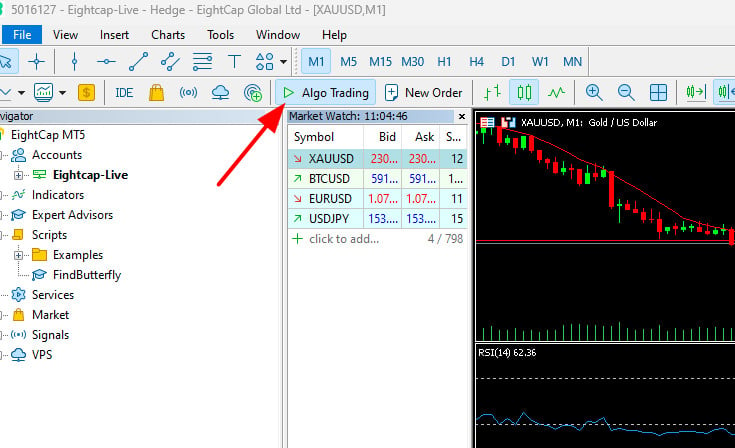
คลิกที่ ปุ่ม Algo Trading ให้เป็นสีเขียว เพื่ออนุญาต ให้ส่งคำสั่งซื้อขายผ่าน library ได้
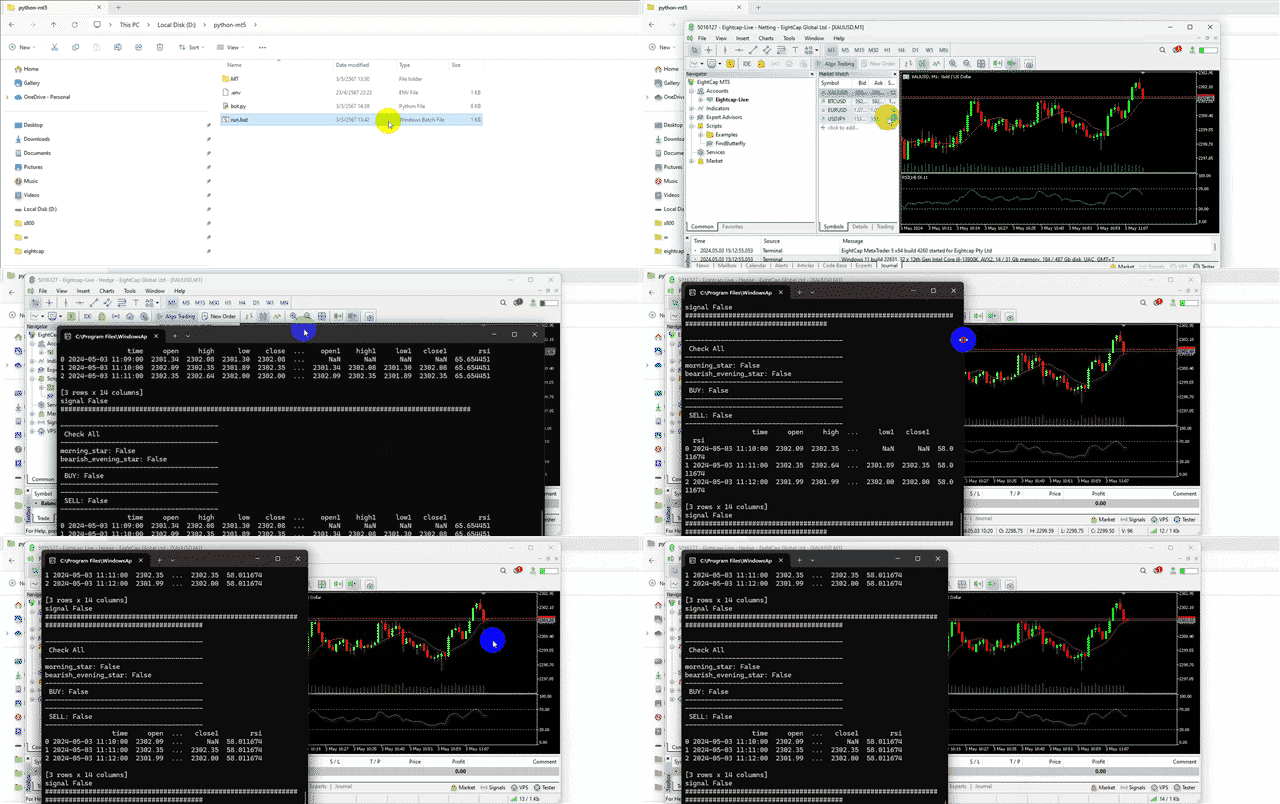
[](https://www.forexinthai.com/wp-content/uploads/2024/05/เปิดสิทธิ์ให้-alog-trading-python-ส่งคำสั่งเทรดได้.jpg)จากนั้น **คลิก run.bat** เพื่อให้ bot ทำงาน
เมื่อรูปแบบแท่งเทียนตรงตามเงื่อนไข bot ก็จะทำการสร้างออเดอร์ให้ และ bot ก็จะหยุดทำงาน ถ้าต้องการให้ bot ทำงาน จะต้อง คลิก run.bat ใหม่
[](https://www.forexinthai.com/wp-content/uploads/2024/05/ทดสอบ-run-สคริปต์-python-bot.gif)
## ผลงาน
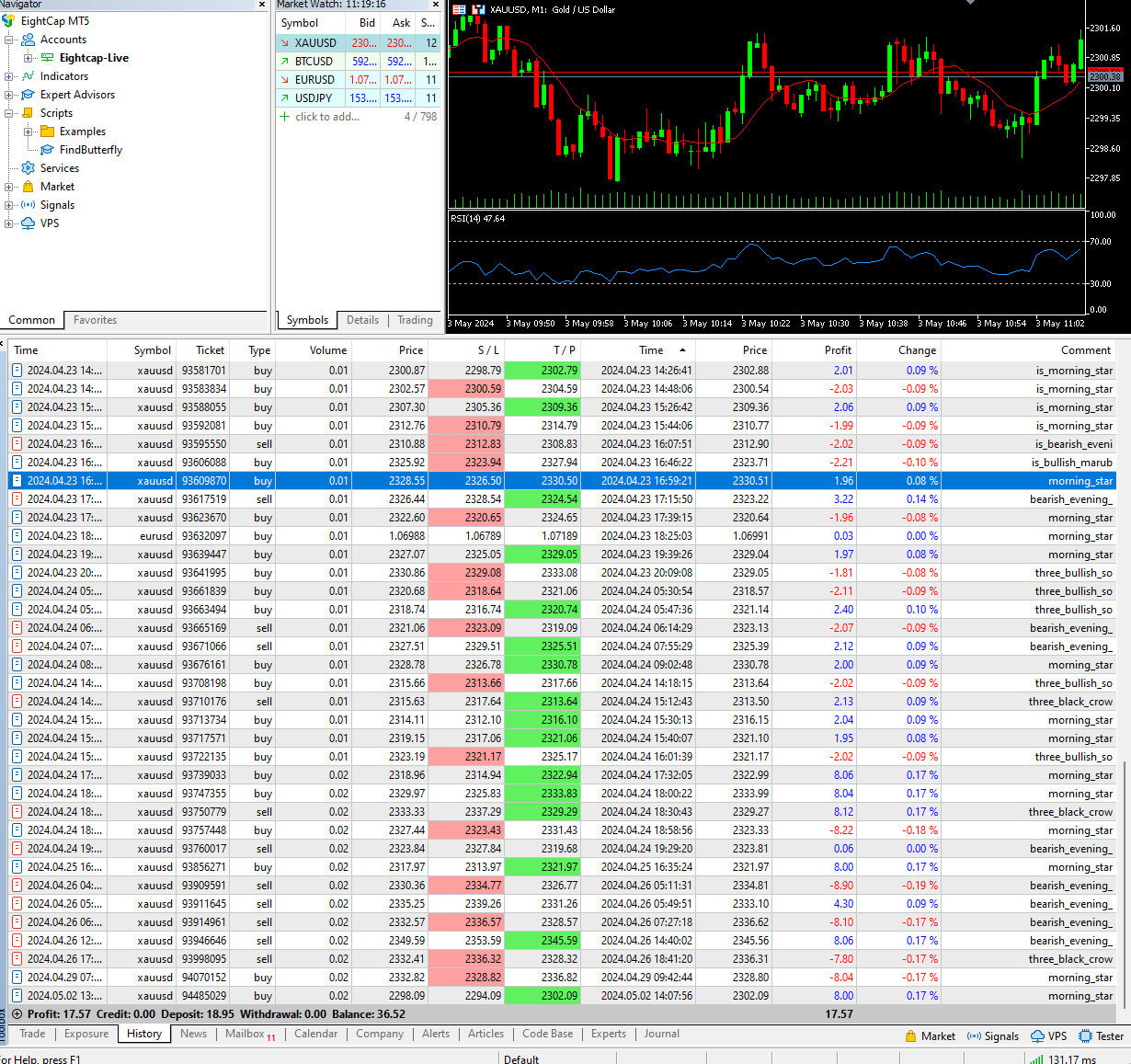
ตัวอย่างผลงาน กำไร $17.57 (ทุน $18.95)
นี้เป็นเพียงผลงาน ไม่ได้การันตีว่า ทุก order จะทำกำไรได้ 100 % นะครับ
[](https://www.forexinthai.com/wp-content/uploads/2024/05/ผลงาน-bot.jpg)
ท่านสามารถดาวน์โหลดไฟล์ สคริปต์ทั้งหมด ได้ในจากลิงค์ด้านล่าง
python-mt5.zip
ตัวอย่างไฟล์ทั้งหมดในบทความ
[ดาวน์โหลด python-mt5.zip](https://www.forexinthai.com/wp-content/uploads/2024/05/python-mt5.zip)
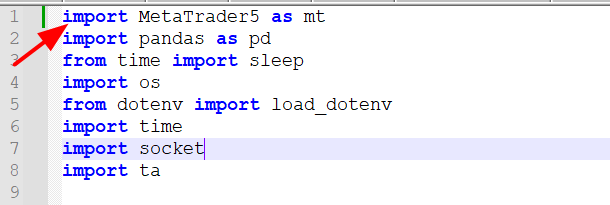
ถ้าขึ้น error ให้ แก้ไขไฟล์ bot.py ตามนี้นะครับ
[](https://www.forexinthai.com/wp-content/uploads/2024/05/mt5-python-เขียนโปรแกรมเทรด.png)## สรุป
การเขียนสคริปต์ Python เพื่อเชื่อมต่อกับ MT5 (MetaTrader 5) เปิดโอกาสให้นักเทรดพัฒนาศักยภาพในการเทรดของตนอย่างมากมาย โดยใช้ประโยชน์จากข้อมูลและอัลกอริธึมที่ได้จากโปรแกรม. ในยุคที่ปัญญาประดิษฐ์ (AI) มีบทบาทเพิ่มขึ้นในทุกด้านของชีวิต, การเรียนรู้และสร้างสรรค์ไอเดียใหม่ๆ สำหรับการเทรดด้วยเทคนิคการเขียนโปรแกรมจึงเป็นทักษะที่มีค่าอย่างยิ่ง. การประยุกต์ใช้ AI ในการวิเคราะห์และการตัดสินใจทางการเงินสามารถช่วยให้นักเทรดได้เปรียบในตลาด และส่งเสริมการตัดสินใจที่มีข้อมูลมากขึ้น ด้วยการเขียนสคริปต์ Python เชื่อมต่อกับ MT5, นักเทรดสามารถนำเสนอวิธีการเทรดที่เป็นระบบและมีประสิทธิภาพสูงได้.
แหล่งข้อมูล
- [https://www.mql5.com/en/docs/python\_metatrader5](https://www.mql5.com/en/docs/python_metatrader5)
-
-