





/
RSS Feed
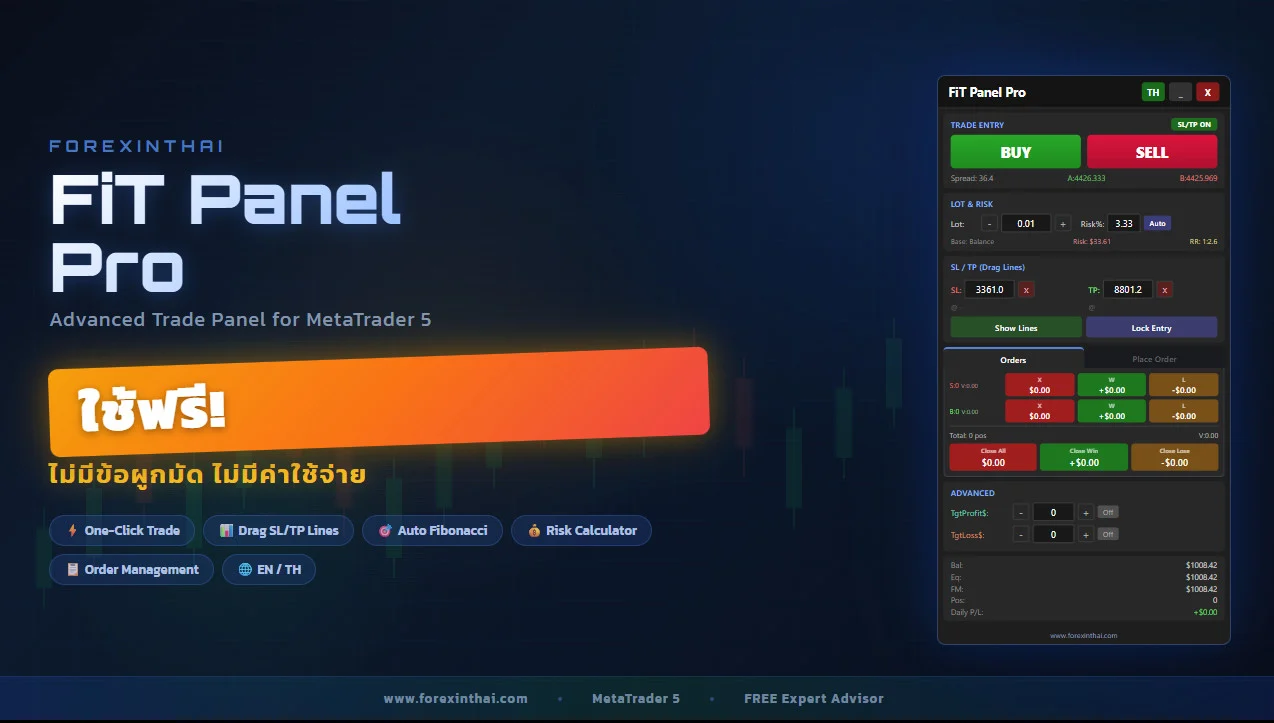
ในโลกของการเทรด Forex และสินทรัพย์ต่าง ๆ ความเร็วและการควบคุมความเสี่ยงคือ “หัวใจสำคัญ” ของกำไร
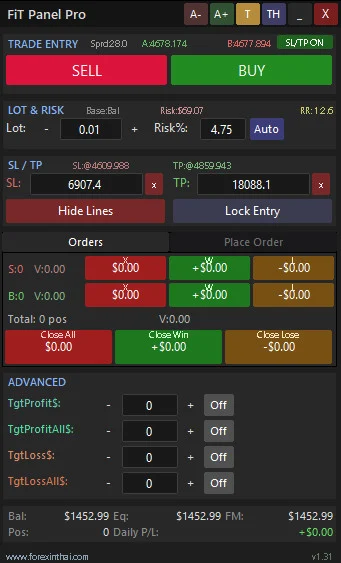
FiT Panel Pro คือเครื่องมือ Trade Panel สำหรับ MetaTrader 5 ที่ถูกออกแบบมาเพื่อช่วยให้คุณ:
- เปิดออเดอร์ได้ทันที
- คำนวณ lot และ risk อัตโนมัติ
- คุม SL/TP ได้แบบ visual บนกราฟ
เหมาะกับทั้ง:
- Scalper
- Day Trader
- Swing Trader
จุดเด่นของ FiT Panel Pro
One-Click Trading
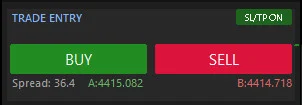
เปิด Buy / Sell ได้ในคลิกเดียว
ไม่ต้องเสียเวลาเข้า Order Window
SL/TP แบบลากบนกราฟ
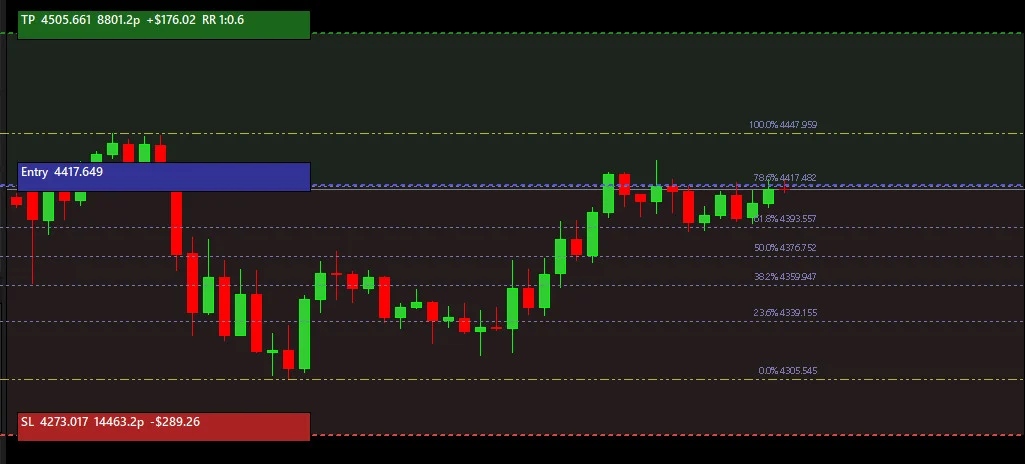
- ลากเส้น SL / TP ได้โดยตรง
- เห็น Risk/Reward เป็นสี (แดง/เขียว)
- เข้าใจง่ายแบบ Visual
Smart Risk Calculator
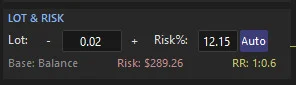
- คำนวณ Lot จาก Risk %
- รองรับ Balance / Equity / Free Margin
- แสดง Risk ($) และ RR Ratio แบบเรียลไทม์
Fibonacci Auto SL/TP
- หา Swing ให้อัตโนมัติ
- ตั้ง SL/TP ตาม Fibo (0.236, 0.618 ฯลฯ)
- ลดเวลาวิเคราะห์
Order Management ครบ
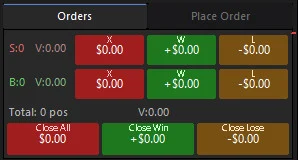
- ดูกำไร/ขาดทุนแบบสด
- ปิดออเดอร์:
- Close All
- Close Winners
- Close Losers
Pending Orders ครบ
รองรับ:
- Buy Limit / Sell Limit
- Buy Stop / Sell Stop
พร้อมระบบตรวจสอบราคาอัตโนมัติ
Target Profit / Loss อัตโนมัติ
- ตั้งกำไรเป็น $ → ปิดออเดอร์เอง
- ตั้งขาดทุนสูงสุด → คุมความเสี่ยงทันที
รองรับ 2 ภาษา (EN / TH)
ใช้งานได้ทั้งภาษาไทยและอังกฤษ
จำค่าทุกอย่างอัตโนมัติ
ไม่ต้องตั้งค่าใหม่เมื่อเปลี่ยน timeframe
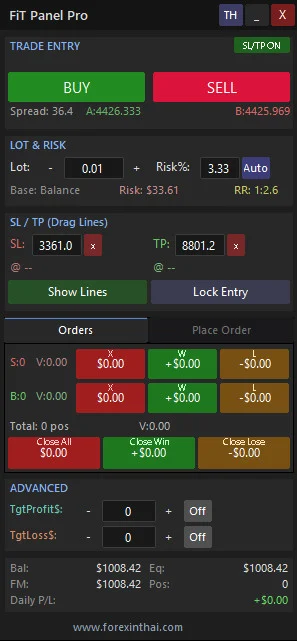
โครงสร้าง Panel
Trade Entry
- ปุ่ม BUY / SELL ขนาดใหญ่
- แสดง Bid / Ask / Spread แบบเรียลไทม์
- Toggle เปิด/ปิด SL/TP
Lot & Risk
- ปรับ lot ด้วยปุ่ม + / –
- ตั้ง Risk %
- กด Auto เพื่อคำนวณอัตโนมัติ
SL/TP (Drag Lines)
- ใส่ pip หรือใช้ลากบนกราฟ
- Lock Entry หรือกำหนดราคาเองได้
Orders Tab
- แสดงออเดอร์ทั้งหมด
- ปิดแยก Buy / Sell ได้
- มีสรุปรวม
Place Order Tab
- ตั้ง Pending Order ได้ครบ
- ระบบช่วยเลือกประเภทที่ถูกต้อง
Advanced
- ตั้ง Target Profit ($)
- ตั้ง Target Loss ($)
Account Summary
- Balance
- Equity
- Free Margin
- Daily P/L
วิธีใช้งาน (Step-by-Step)
- เปิด Algo Trading ใน MT5
- ลาก FiT Panel Pro ลงบนกราฟ
- ตั้งค่า Lot และ Risk %
- กด Auto เพื่อคำนวณ
- ลาก SL/TP หรือกำหนดค่า
- กด BUY หรือ SELL
- จัดการออเดอร์ผ่านแท็บ Orders
การตั้งค่า (สำคัญ)
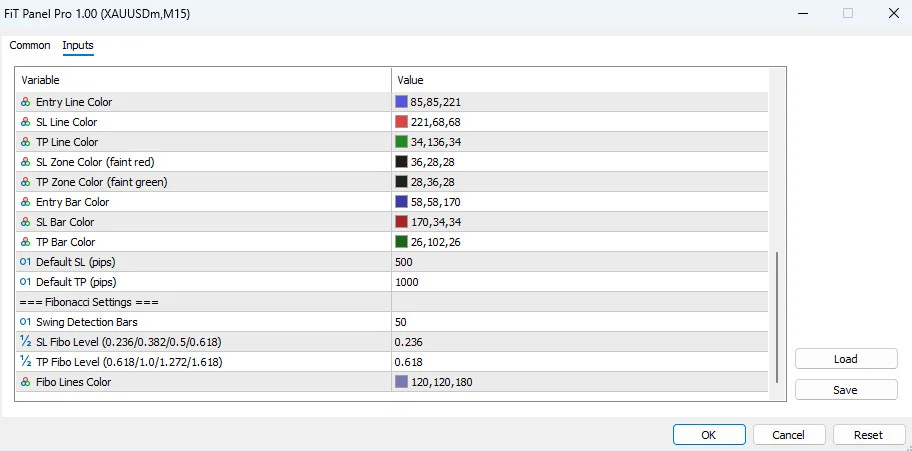
Trade Settings
- Default Lot: 0.01
- Risk %: 1%
- Base: Balance / Equity / Free Margin
- Magic Number: ใช้แยกออเดอร์
SL/TP & Fibonacci
- Default SL: 500 pips
- Default TP: 1000 pips
- Fibo Levels: 0.236 / 0.618
ความต้องการระบบ
- MetaTrader 5 (Build 2500+)
- เปิด Algo Trading
- ใช้ได้ทุก Symbol (Forex, Gold, Crypto ฯลฯ)
- ทุก Timeframe
ข้อควรระวัง
- ระบบจะจัดการเฉพาะออเดอร์เกิดจาก FiT Panel Pro เท่านั้น Order จาก EA ตัวอื่น หรือ Order ที่เทรดบนมือถือ ระบบจะไม่จัดการนะครับ
- การเทรดมีความเสี่ยงสูง
- ควรใช้ Risk Management เสมอ
สรุป
FiT Panel Pro คือเครื่องมือที่ช่วยให้คุณ:
- เทรดเร็วขึ้น
- ลดความผิดพลาด
- คุมความเสี่ยงได้แม่น
เหมาะมากสำหรับคนที่ต้องการ “ยกระดับการเทรดแบบมืออาชีพ”
New in version 1.31
What’s new in version 1.31 2026.04.1
- swap SELL/BUY button order
What’s new in version 1.30 2026.03.30
- Panel Width +15% & Height -30%
— Default width increased from 300 to 345 pixels
— All sections compacted: info rows merged into title bars
— Trade Entry, Lot & Risk, SL/TP, Status sections reorganized
— Panel fits smaller chart windows while showing more data per row - TgtProfitAll$ (Target Profit ALL)
— New control in Advanced section (below TgtProfit$)
— Closes ALL open positions when total combined profit >= target
— Different from TgtProfit$ which closes one position at a time
— Includes [-] [edit] [+] [ON/Off] controls - TgtLossAll$ (Target Loss ALL)
— New control in Advanced section (below TgtLoss$)
— Closes ALL open positions when total combined loss >= target
— Different from TgtLoss$ which closes one position at a time
— Includes [-] [edit] [+] [ON/Off] controls - Apply Theme Button [T]
— New button in the title bar (next to font size buttons)
— One-click applies FiT Panel Pro dark chart theme
— Sets background, candle colors, grid, bid/ask line colors
— No .tpl file needed — all settings are built into the EA
What’s new in version 1.20 2025.03.25
- DPI Scaling Support
— Auto-detects Windows display scaling (100%–300%)
— Font size automatically adjusts to match panel proportions
— No more oversized text on high-DPI monitors (e.g. 125%, 150%) - Font Size Buttons [A+] [A-]
— New buttons on the title bar for real-time font size adjustment
— Increase or decrease font size with one click (range 5–14 pt)
— Panel redraws instantly — no need to restart the EA - Auto-Center on First Launch
— Panel automatically appears at the center of the chart window
— No more manual repositioning after first attach
— Position is saved and restored on timeframe changes as before - Improved Trade Entry Layout
— BUY/SELL buttons moved down to prevent accidental clicks near SL/TP toggle
— Spread, Ask, Bid labels rearranged in a single row — no overlap
— SL/TP ON/OFF toggle relocated to section title row for cleaner layout
ขอบคุณ
- G9_Lck9 – youtube.com
- happynftgame4711 – youtube.com
- Mirel Daniel Gheonu – mql5.com
- parinchai – mql5.com
- Prathamesh Prakash Gawde – mql5.com
- Steven Tanpuyani – mql5.com
- Christian Putra – mql5.com
- Albert Chandra – mql5.com
- mr.s5941 – youtube.com